arades Association Suite · Association software

Association software for associations and chambers.

Fee runs, the course business, CPD credits and certification run on one shared set of data instead of in four separate systems — the head office maintains each person once, and your members see their invoices and bookings themselves in the portal. Built on Microsoft, for associations with several legal entities, for example an association and its academy.

1,000–50,000 members target organization size Association and academy several legal entities CPD credits and attendance certificates Business Central integrated, not exported
Microsoft Dataverse Power Platform Dynamics 365 Business Central Power BI Copilot Azure Your own member portal
Team working on laptops — member data, course bookings and accounting in separate systems
4 systems
one person, maintained four times

The problem

One person, four systems — and none of them knows about the others.

Member data in one application, course bookings in the next, the accounting somewhere else, the certificates in a spreadsheet. The same person is maintained several times over, histories get lost, and every analysis starts with a manual reconciliation.

The arades Association Suite brings these areas onto one shared set of data: one person, one organization, one history — from the membership application through the course and the CPD record to the invoice and the direct debit. What happens in the head office is what your members see in the portal; what is billed is created in Microsoft Dynamics 365 Business Central and flows back from there.

The difference

What standard software does not know about associations.

A general CRM knows customers and cases. It does not know the five particulars on which everything turns in an association’s everyday work.

Back-office staff in conversation — association software for 1,000 to 50,000 members
1,000–50,000
members

Is this right for us?

Who the solution is made for — and who it is not made for.

Made for:

  • medical and scientific societies with continuing education
  • professional and trade associations that manage memberships, fees, committees and working groups
  • chambers and associations with an academy or service company of their own
  • organizations that run certification procedures for centers or individuals

Typical size: 1,000 to 50,000 members, 5 to 50 staff in the head office.

Not made for: small, volunteer-run clubs. The solution is too extensive for that — and we would rather say so beforehand than after the rollout.

On the price: how the price is made up is set out further down. Up front: no share of your course revenue and no billing by the minute.

The areas

Seven areas, one set of data — and the everyday work around them.

01 · Members

Member management

Memberships with a continuous history — level changes count as periods of their own.

  • Annual fee runs with a joining cut-off date and optional pro-rata calculation
  • Committees and working groups with offices and terms of office
  • Relationships between people and organizations, with start and end dates
  • A timeline across an entire career, attributes and consents
  • Leaving and death: mailing suspension, ending of offices and flagging of open items take effect automatically
02 · Courses

Course and CPD management

Course offerings, sessions and capacities, together with speakers and their qualifications.

  • Online registration through your website — possible without an account
  • Signed in to the portal, the member price applies automatically
  • Waiting list with an offer of a freed-up place and a confirmation deadline
  • Cancellation with a credit note, duplicate registrations are detected
  • Course materials from the release date, booking confirmation by email
  • CPD credits per course, attendance certificate as a PDF
03 · Certification

Certification

Certification programs with specialist fields, levels and requirements — freely configurable.

  • Centers, institutions and individuals can be certified
  • The requirements for recognized individuals — membership, working group, CPD credits — are checked automatically
  • Procedures from application to decision
  • An auditor pool with a conflict-of-interest check
  • Deadlines and recertification
  • Fee handover to the accounting
04 · Communication

Newsletters and serial mailings

The audience is a segment of the membership record, not a list someone keeps up to date.

  • Trigger-based journeys that react to an action such as a registration
  • Channels: email, text message and push notification
  • A consent center manages recipients’ preferences
05 · Events

From the annual conference to the committee meeting

Annual conference, CPD series or committee meeting with sessions, session tracks and speakers.

  • Attendee passes for individual sessions
  • Buildings, rooms and room layouts, accommodation logistics, sponsors
  • Microsoft Teams webinars
  • Registration forms to embed in your own website
  • Attendance history on the contact — next to membership and CPD credits
06 · Portal

Member portal

A web application of its own for your members, in your corporate design, in German and English.

  • Usable on a smartphone and installable as an app
  • An overview of membership, open invoices and the next course
  • Book courses and view your own bookings
  • Download invoices and credit notes as PDFs with their payment status
  • Every member sees only their own data — checked on the server with every request
07 · Accounting

Accounting with Business Central

Invoices and credit notes are created automatically from the fee run, the course booking and the cancellation — in the right company for each legal entity.

  • SEPA direct debit mandates are passed from member management
  • The collection is run on a schedule in Business Central
  • The open amount and the invoice PDF come back into the member record and the portal
  • In the event of death, billing is suspended instead of being continued unchanged
Alongside

The everyday work around it

Roles and permissions per legal entity: every member of staff sees only the data their own task needs.

  • Four dashboards: membership development, courses, certifications and — with the newsletter component — the newsletter overview
  • Context-sensitive help on every form and every list, in German and English
  • 260 help pages inside the application instead of a manual in the next room
  • Tasks and reminders directly on the record — the notification that goes with them is in preparation

Communication and events require Dynamics 365 Customer Insights – Journeys; for plain bulk email, a lean newsletter component of the suite is in preparation. Which variant suits you is something we clarify during the requirements review.

From membership application to direct debit — and where each step runsSix steps across the modules: online membership application on the website, admission and fee run in member management on Dataverse, invoice and SEPA direct debit in Business Central, status in the member portal.1Online membership applicationWebsite2AdmissionMember management3Fee runMember management4InvoiceBusiness Central5SEPA direct debitBusiness Central6Status in the portalMember portal

The closed chain

From the membership application to the direct debit — with no manual handover.

Individual pieces of this exist in many solutions. What saves time is the chain: every step takes over the data of the previous one, nobody types anything twice.

  • 1Online membership applicationProspective members apply on your website — as an individual or on behalf of an organization. The head office reviews the application and decides.
  • 2AdmissionAdmission creates the membership with its level and start date; the person receives a membership number and an invitation to the portal.
  • 3Fee runThe annual run takes the joining cut-off date into account and calculates pro rata on request — for all members of a legal entity in a single pass.
  • 4Invoice in Business CentralThe run creates invoices in the company of the responsible legal entity. If a person is billed by a further legal entity for the first time, the solution creates them there as a customer automatically.
  • 5SEPA direct debitThe mandate comes from member management; the collection is run on a schedule in Business Central.
  • 6Status in the portalIn the portal, the member sees the same status as the head office — without anyone having to pass on a payment receipt.
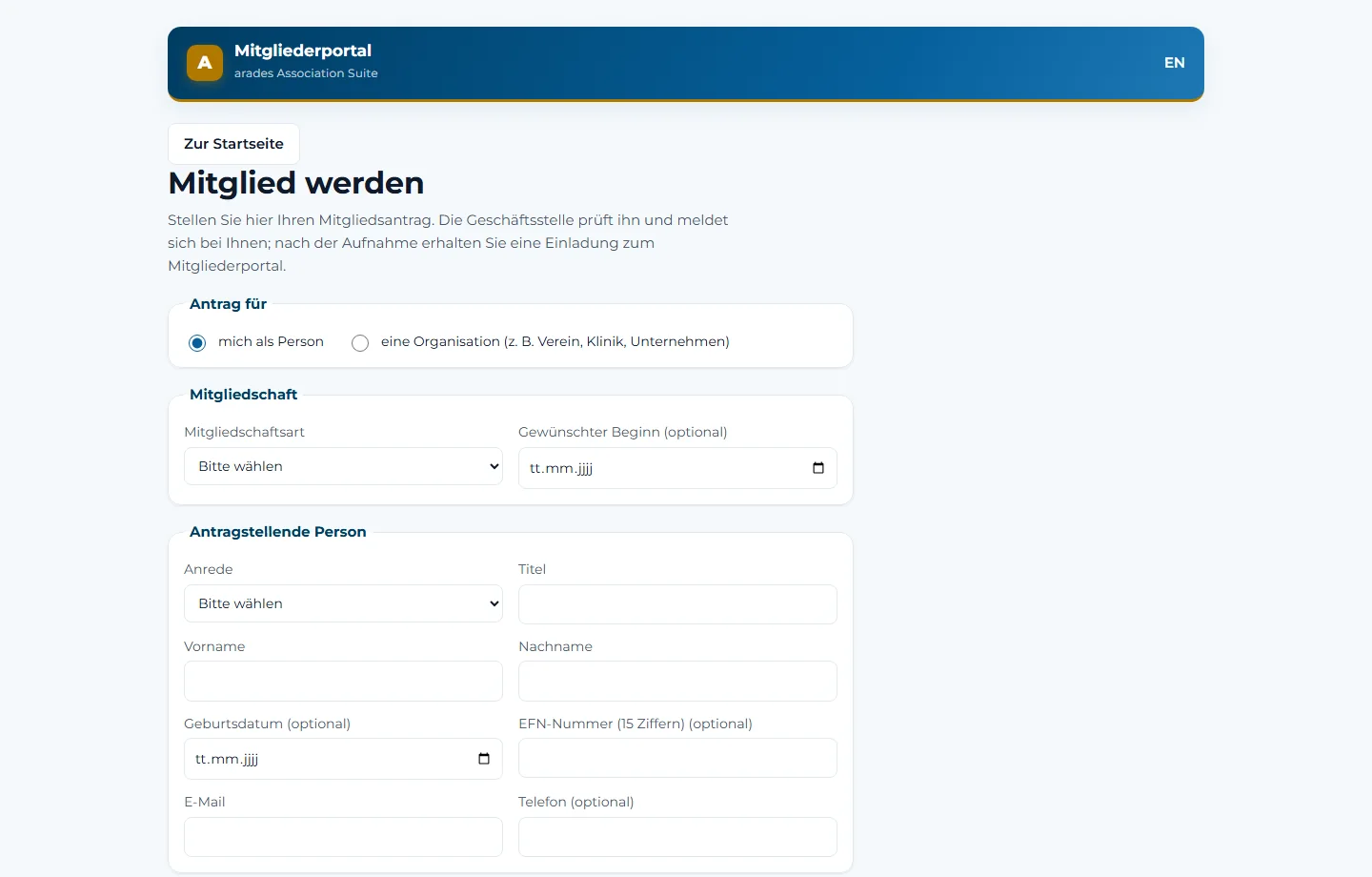
Online membership application in association software: application as an individual or for an organization, membership type and master data

The online membership application — as an individual or for an organization. Sample data from the demonstration environment.

What happens behind the scenes. Customer records are created in Business Central with invoice address, payment terms and dunning method — whatever is maintained there is never overwritten by the suite. The booking confirmation states the gross amount from the document in Business Central; the suite does not calculate the tax itself. The Business Central extension is labelled in German throughout. Membership numbers follow a freely configurable pattern with a yearly index, and applications for organisations flag possible duplicates before anyone overlooks them.

Course booking — and where each step runsSix steps: registration on the website or in the portal, place or waiting list in course management, booking confirmation by email, course materials in the member portal, points and certificate in course management, invoice and credit note in Business Central.1RegistrationWebsite or portal2Place or waiting listCourse management3Booking confirmationEmail4Course materialsMember portal5Points and certificateCourse management6Invoice and credit noteBusiness Central

Process

From online registration to the certificate of attendance.

Course management is a module of its own — but it reads the same people record and hands the invoice to the same accounting system.

Around the registration. The certificate of attendance follows its own template per organiser and course, and is issued only after approval if you want it that way. For each course you set the reporting target — medical association, no report, or another body; the suite reminds you of the reporting deadline. Transmission to the EIV is in preparation. Reductions are checked against the proof on file. If a registration is declined, the place becomes free again; if the organiser cancels a course, nobody moves up from the waiting list by accident.

Certification procedure — and where each step runsSix steps: application via portal or back office, automatic check of the requirements, auditor from the pool with a conflict-of-interest check, decision, fee in Business Central, deadline and recertification.1ApplicationPortal or back office2Requirements checkedautomatically3Auditor assignedPool, conflict checked4DecisionCertification5FeeBusiness Central6Deadline and recertificationCertification

Process

From application to recertification.

Membership, working group and CPD credits are checked automatically — they sit in the same set of data as the procedure itself.

And within the procedure. Upgrades and a change of operator or management run as procedures of their own, with their own status — not as a silent edit to the running case.

A look inside

What your members see.

The member portal is a web application in its own right, not a rebuilt form. All images show sample data from the demonstration environment.

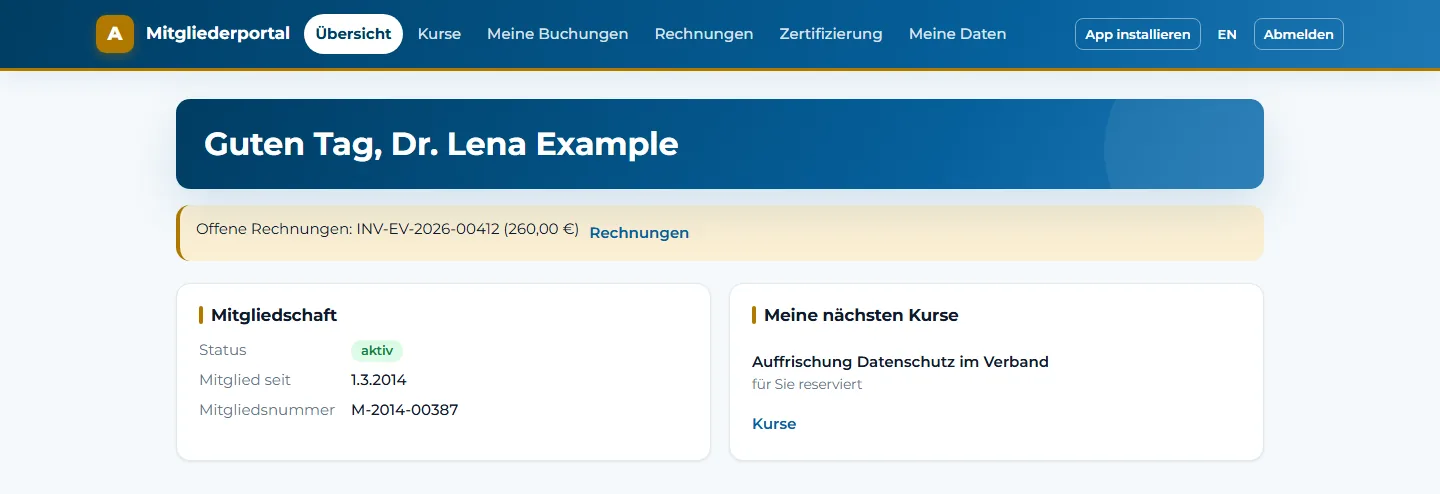
Member portal of an association software: overview with membership, open invoice and next course

The portal home page: membership, open invoice and the next course at a glance.

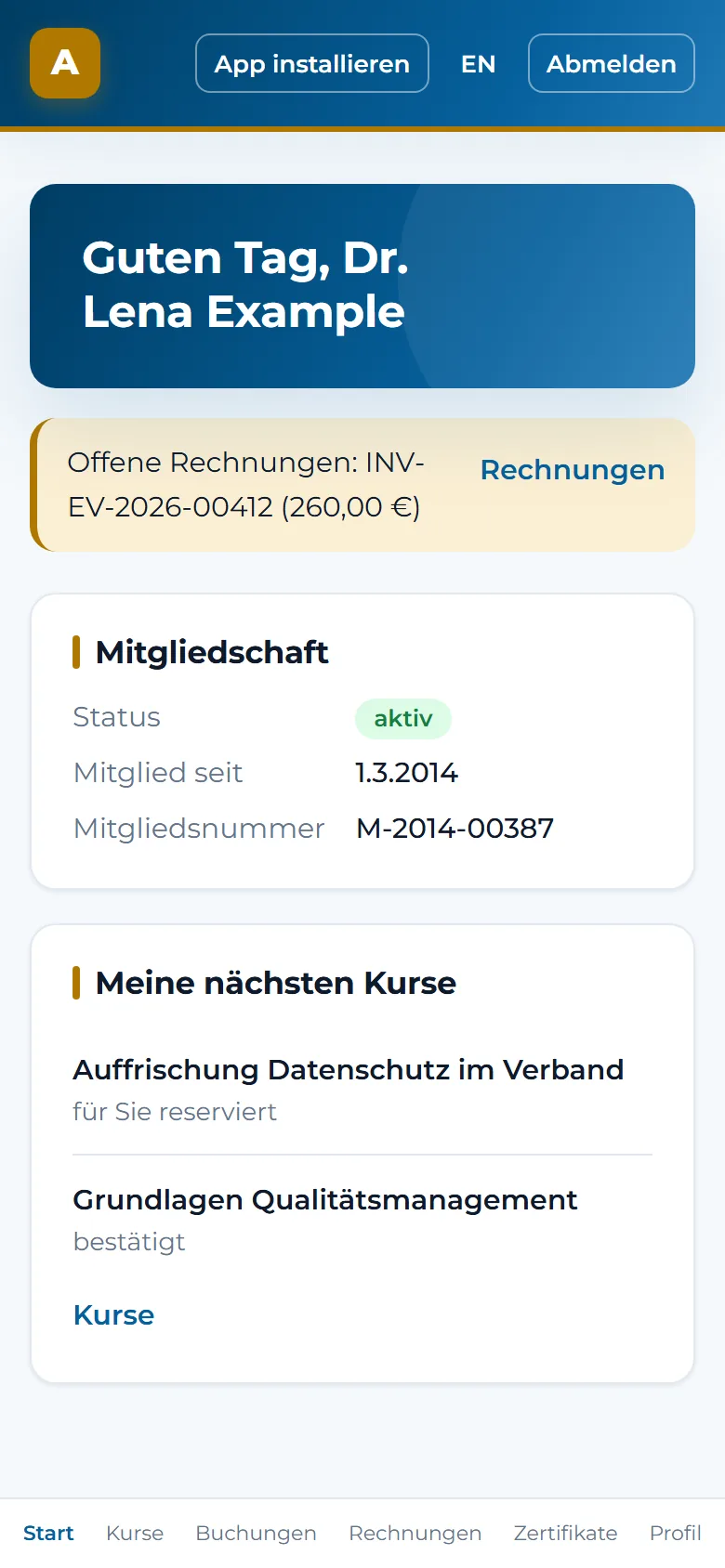
Member portal on a smartphone with bottom navigation to home, courses, bookings, invoices, certificates and profile

The same portal on a smartphone — installable as an app, with its own navigation along the bottom edge.

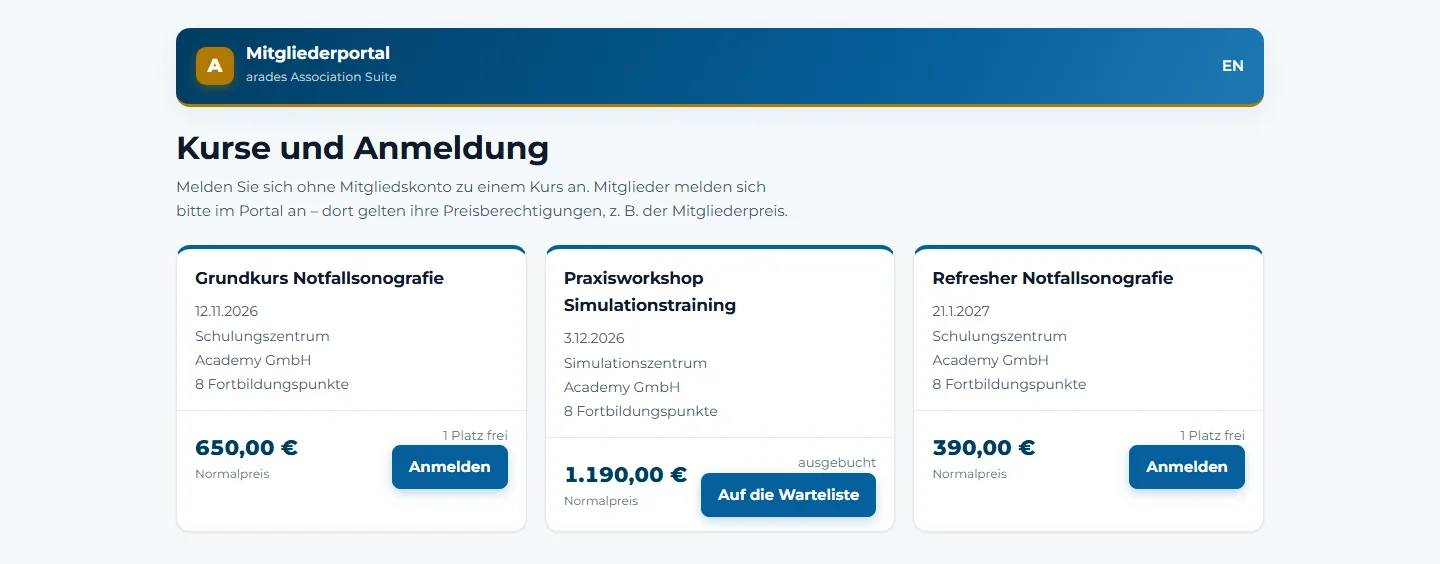
Public course registration with available places, waiting list and CPD credits per course

The public course page: available places, waiting list and CPD credits per course. Registration is possible without an account; the course fees shown are sample data of the organizer.

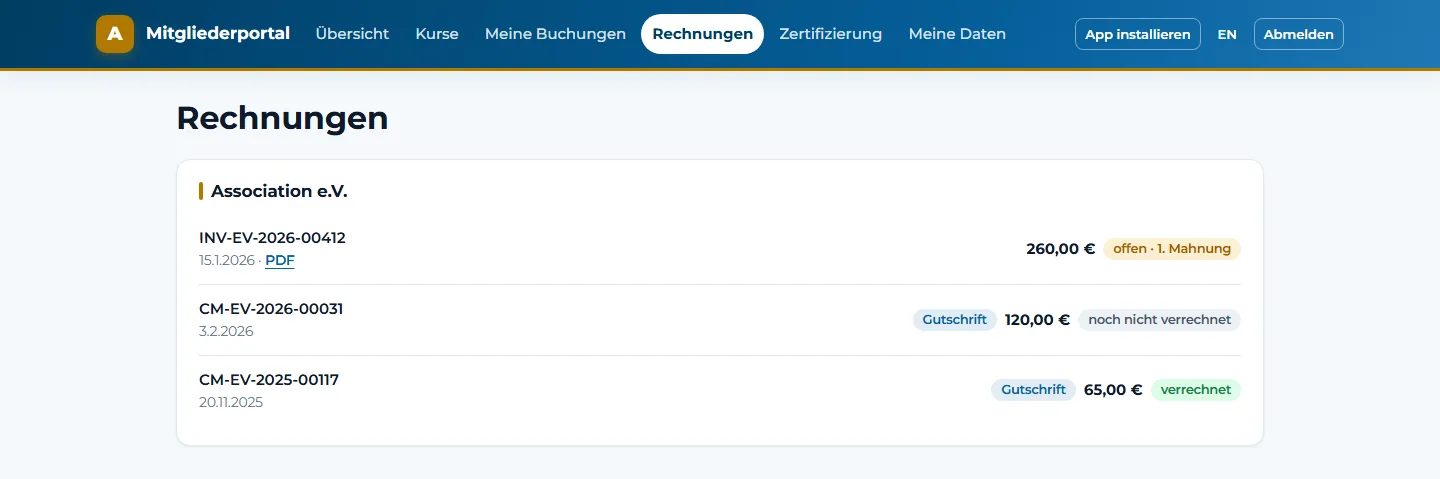
Invoices and credit notes in the member portal with payment status and invoice PDF from Business Central

Invoices and credit notes with payment status and PDF — the figures come back from Business Central, not from a second invoice. The dunning level comes back from the dunning process in Business Central.

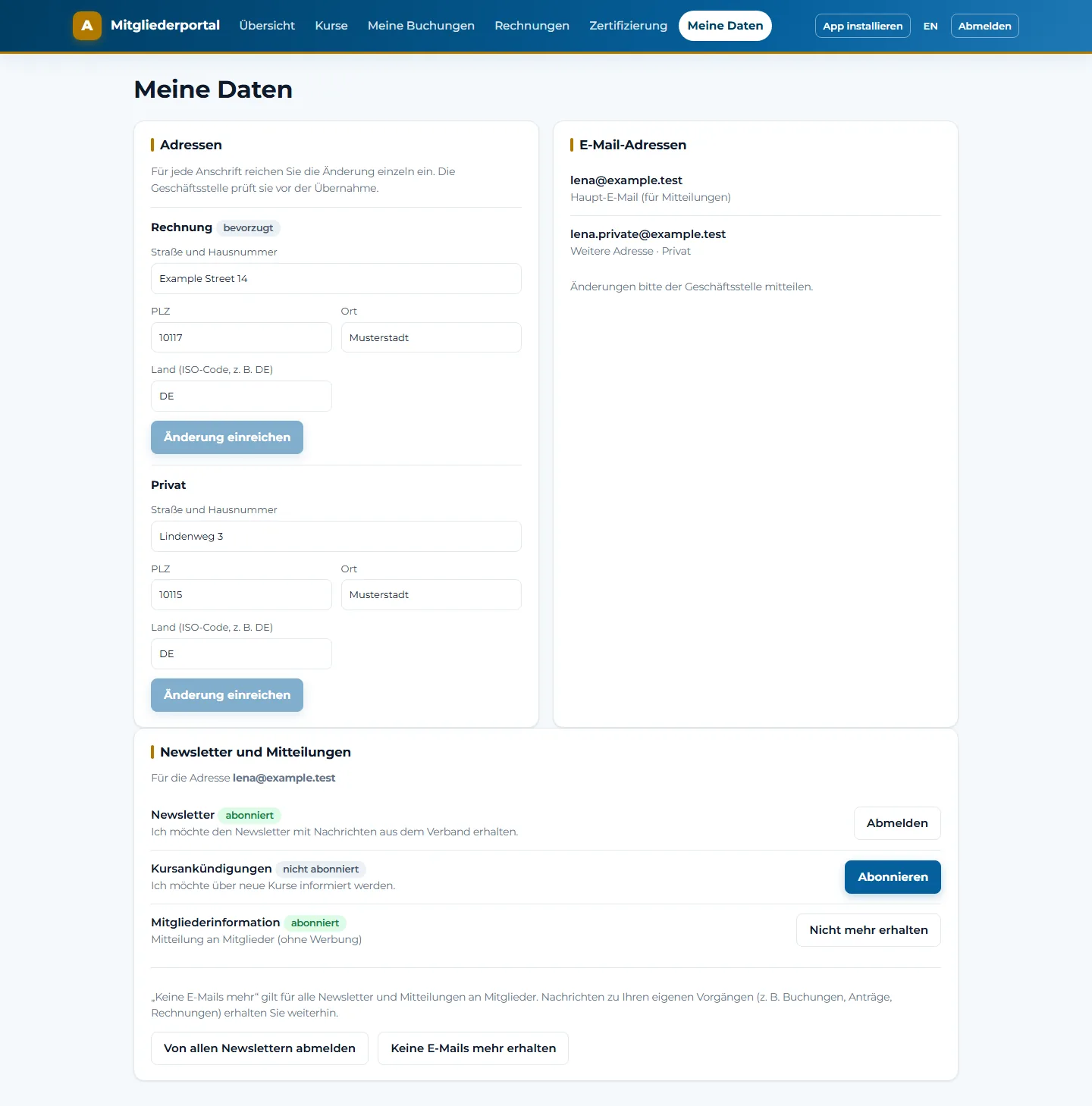
Personal data in the member portal with billing and home address, change requests, email addresses and newsletter settings

Under “My data”: each address as a separate change request, several email addresses, newsletter settings.

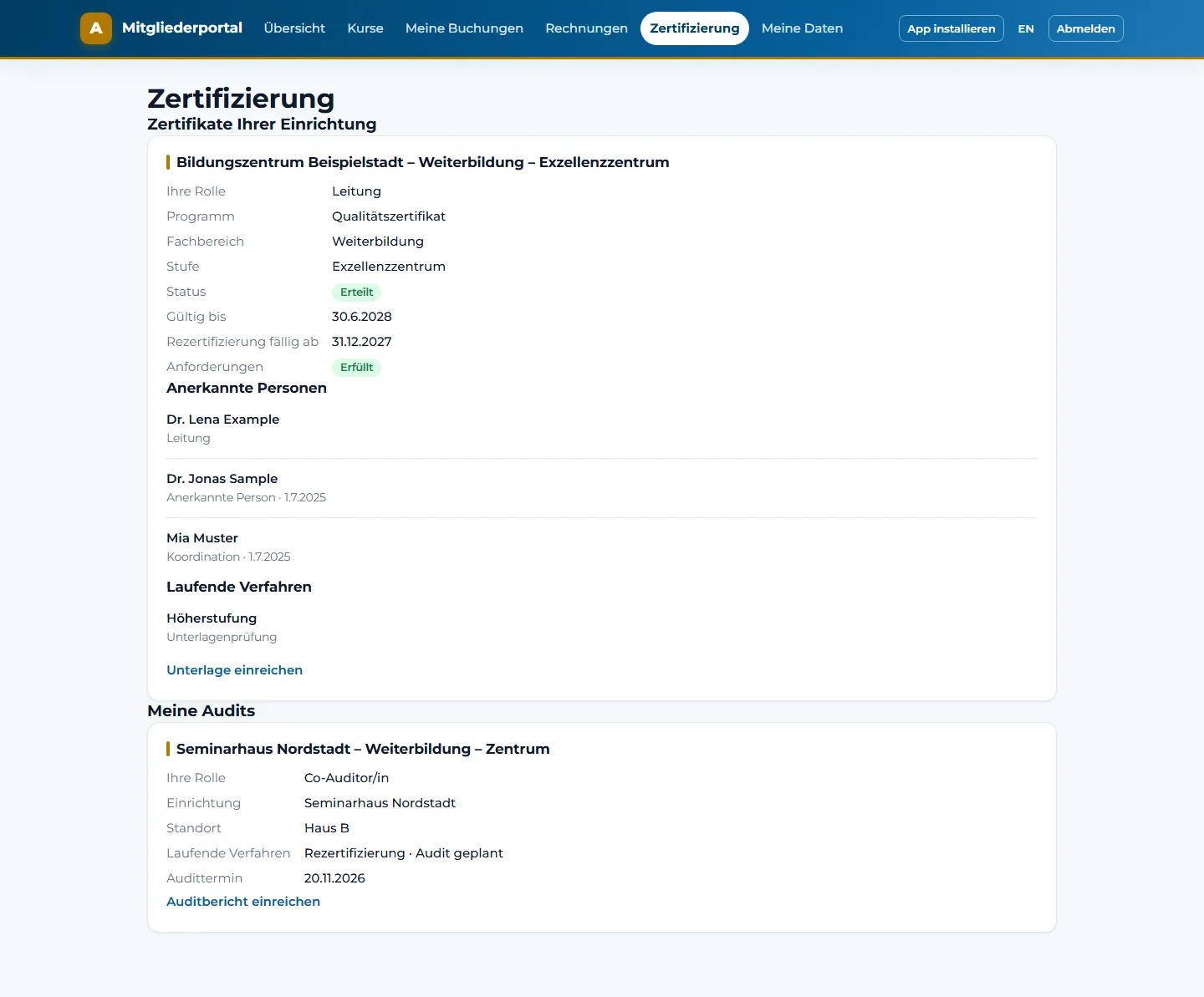
Certification area in the member portal with the organisation’s certificate, recognised persons, an ongoing procedure and an assigned audit

The certification area for certified institutions and auditors: certificates, state of the requirements, ongoing procedure.

What members handle themselves. Under “My data” every member submits changes to each address individually as a request; alongside the main email address, further addresses can be stored. A place offered from the waiting list can be declined in the portal. Every price shows why it applies — “member price”, “reduced price” or “staff price”. Credit notes are marked as settled or not yet settled. For certified institutions and auditors there is a dedicated area with certificates, the state of the requirements, and the submission of documents and audit reports. If an invitation link leads nowhere, the portal says why — instead of showing an empty page.

Next step

Walk through your own processes with sample data?

We show you your most important processes with sample data — from the fee run to the invoice.

The architecture

Each module on the Microsoft building block made for it.

What holds them together is one shared set of data and sign-in with your existing Microsoft account.

Structure of the arades Association SuiteAt the top, access: the member portal, a web application of its own on Azure, reads and writes. Below it, Microsoft Dataverse as one set of data for all modules, with member management, course and CPD management, certification, and events and communication through Dynamics 365 Customer Insights Journeys. Below that, financial management in Microsoft Dynamics 365 Business Central, to which fees and charges are handed over. On the left and the right, two lanes run across both layers: reporting with Microsoft Power BI and AI assistance with Microsoft Copilot. Both read Dataverse and Business Central; the Copilot licences are bought separately. The layer with Dataverse and the modules is the access for staff; the portal above it is the access for members.ReportingMicrosoft Power BIAI assistanceMicrosoft CopilotACCESS FOR MEMBERSMember portala web application on Azurereads and writesACCESS FOR STAFFMicrosoft Dataverseone set of data for all modulesMember managementMaster data, committees, feesCourse and CPDCourses, CPD credits, proofCertificationProgrammes, procedures, deadlinesEventsCustomer Insights JourneysFees and chargesFinancial managementDynamics 365 Business Central
Module Runs on
Member management
This is where number ranges and the set of people are created; the other modules read from it instead of keeping copies.
Microsoft Dataverse
Course and CPD management
No reconciliation between course registration and membership record, because there is no second database.
A module of our own on Dataverse
Certification
Reads membership and CPD credits directly instead of being notified of them.
A module of our own on Dataverse
Member portal
Not a model-driven app but a standalone web application in your own Azure environment — members need no access to the administration.
Microsoft Azure
Financial management
A full ERP rather than a rebuilt accounting system; fee runs and charges are handed over to it.
Dynamics 365 Business Central
Events and communication
On the same Dataverse; audiences are segments of the membership record, not a separate mailing list.
Customer Insights – Journeys
Reporting
Reads the data directly and can take on the permissions of the person who opens the report.
Microsoft Power BI
AI assistance
Optional, on top of the modules. The licences are purchased separately and are not part of the suite.
Microsoft Copilot

What this means for the rollout. The modules do not all go live on the same day. Member management comes first; the others follow in the order that suits your processes.

The building blocks

Standard Microsoft products, not rebuilt equivalents.

Which of them you need depends on the areas you choose. What each one does is set out in full on its own page.

Microsoft Power BI report on a laptop — membership growth, course occupancy and outstanding dues in a single report
Power BI
reporting across all modules

Reporting

Figures for the board — from one set of data, not three spreadsheets.

Membership growth, course occupancy and outstanding dues sit in the same database. Microsoft Power BI reads them directly, with no one merging spreadsheets first.

Dataverse comes with its own views and charts; for everyday questions they are enough. Power BI goes beyond that: a report that puts memberships, course bookings and CPD credits side by side and adds the figures from Business Central — which has a Power BI connector of its own. The other way round, Business Central ships pages with a Power BI report part already built in.

What matters for associations is who may see what. A report that reads Dataverse directly can run in the security context of the person who opens it: whoever is responsible for one entity sees that entity’s figures; the head office sees all of them. The permissions then come from the same role management as in member management and are not maintained a second time in the reporting tool. That comes at the cost of response time; where speed matters more than up-to-the-minute figures, the report works from a copy refreshed regularly — and the permissions are reproduced there.

What is included and what is not: Power BI is licensed separately and is not part of the suite. We do not ship a ready-made set of reports. We set up the connection and build the reports you need — or your own team does, because the tool is standard and stays in your hands.

Two members of staff at their desks with laptops — Copilot answering questions on the organisation’s own membership record
Copilot
on your own set of data

AI assistance

Copilot as a building block of the suite — on the same data as the modules.

AI is part of the workplace by now, and the first question is not whether Copilot answers but what it answers from. Because every module of the suite sits on the same Dataverse, the answer is the membership record itself — made available under the permissions you maintain for it anyway.

Dataverse can be added directly as the knowledge source for a Copilot agent — up to fifteen tables per source, read-only by design. No second permission model is created: Microsoft puts it this way, that the Dataverse security settings regulate all data and no responses are given to users who do not already have access to the data; for unstructured content, that is checked at the moment the question is asked. Because memberships, courses, certifications and events sit in the same set of data, one release covers all four areas.

That is the practical side of the modules running in your own Microsoft tenant: nothing has to be copied into a second index and no permission structure has to be rebuilt before Copilot may answer. The groundwork that otherwise comes before the first question has already been done with member management.

What is included and what is not: the Copilot licences are not part of the suite; they are bought separately, per user or per capacity. Some of the capabilities named here are still marked as preview by Microsoft. And the answers remain suggestions: Microsoft explicitly requires human review for the capabilities named here. What is actually available in your environment is something we establish in the requirements review.

Questions to the membership record

A Copilot agent with Dataverse as its knowledge source answers questions about memberships, courses and certifications — including the kind that has to filter rather than look up a single record. Multiline text columns and file columns on the record can be included; Microsoft marks that extension as preview. Dataverse search has to be switched on and the agent has to sign its users in against Microsoft Entra; the search index consumes Dataverse capacity.

Copilot in the management application

Inside member management itself, Copilot answers questions about the application’s data and summarises a record. This too is explicitly read-only — creating and changing are not part of it. Answering questions requires a Power Apps premium licence and a Microsoft 365 Copilot licence per user; record summaries are a capability of their own and require the Power Apps premium licence. Both have to be switched on by an administrator.

Copilot in Business Central

On the finance side: chat to find company data and ask how things are done, plus summaries, autofill and bank account reconciliation — Copilot proposes matches between bank statement lines and ledger entries, and a posting account for the lines it cannot match. For an association collecting membership fees, that is where the benefit shows first. Available in Business Central online only.

Copilot in Power BI

In reporting, Copilot summarises reports and helps build them. Cost matters here: it takes a paid Fabric capacity from F2 or Power BI Premium from P1 — a Pro licence on its own is not enough, and trial capacities are not supported.

And data protection? The data does not leave your Microsoft environment; Copilot works under the same permissions you maintain anyway. What arades processes in doing so is governed by the data processing agreement; the details are in the FAQ further down.

CPD event with an audience — association, academy and further entities invoice separately and manage jointly
Several entities
one people record

Multiple legal entities

Association, academy, service company — separate books, shared administration.

Many associations run a service company or an academy alongside the association itself, some of them several. In accounting terms these are separate worlds; in terms of people it is one: the same person is a member of the association and a participant in a course run by the academy.

The suite separates what belongs apart and connects what belongs together: one company of its own per legal entity in Business Central, roles and permissions of its own per entity in the application — and beneath it one shared set of people and addresses. Nothing is fixed at two entities; two is simply the most common case. A person or an organisation can be assigned to exactly one company or to several, depending on where they actually appear.

The benefit shows where data would otherwise be retyped: if a person is billed by a further entity for the first time, the solution creates them there as a customer automatically. A change of address is maintained once and applies everywhere. And a report across all entities needs no reconciliation, because there is only one set of people. How many entities make sense in your case depends on your Business Central licensing — we establish that in the requirements review.

Verified quality

Every core process is backed by automated tests.

From the membership application to the direct debit: the processes your head office relies on are checked by machine — not just clicked through by hand once.

7

areas in one solution — one person, one history, no duplicate maintenance

23

end-to-end test scripts for the core processes, from application to billing

260

help pages inside the application, for every form and every list, in German and English

2

trial runs for the data migration, with reconciliation — before the switch-over date

In addition, there are a user manual and an administrator manual in German. Under the hood: 371 automated test methods in the source code and 63 tables of our own in the data model — the domain knowledge sits in the model, not in free-text fields. The test, table and help figures are counted from the source code and the help catalog.

Further development

A platform that grows with your requirements.

The suite does not stand still. What is in the standard today covers the recurring processes of an association; what is needed beyond that is built on the same platform — without changing systems.

Continuous further development

The suite is developed continuously. Areas of extension are further integrations, more self-service in the member portal, more automation, AI support and specialized sector processes. Which of these is available in your timeframe is something we tell you in the requirements review — as an outlook, not as a commitment.

Individual extensions thanks to Microsoft Power Platform

Because the solution rests on Microsoft Dataverse and Power Apps, additional data models, forms, workflows and interfaces are built in the same toolkit. Low-code, reusable components and a shared data foundation can speed up delivery and make it more economical. Scope and effort depend on the individual case, and the licenses required come on top.

Meeting at a German chamber of commerce abroad — years of experience with chamber administration processes on Microsoft Dynamics 365
Chambers
Sector experience

Experience with chambers

Chamber processes: experience from a live Dynamics 365 project.

arades has looked after the business processes of a German chamber of commerce abroad for several years, with a solution built specifically for them on Microsoft Dynamics 365. It supports the administrative processes already in place there.

Chambers also have processes that associations otherwise do not deal with: ATA carnets, certificates of origin, visa confirmations and attestations, each with fee calculation and approval steps. Such applications are neither part of the Association Suite nor a finished product of ours. Depending on the functional and technical requirements, they can be designed individually and built on the same platform — what that means in your case is something we establish in the requirements review.

Anonymized at the customer’s request.

The platform

What you keep when you no longer need us.

The platform you already have

Your staff sign in with their existing Microsoft account. Outlook, Teams and Excel work with the same data. There is no second user administration for anyone to maintain. User administration, data format and reporting tools stay the ones you already have — including on the day you stop using the suite.

Your data in your environment

The solution runs in your own Microsoft environment. The data sits in Microsoft Dataverse, is reachable through the standard interfaces and can be exported at any time. No proprietary file format that ties you to us.

Extensible — even without us

Your staff automate processes with Power Automate; analyses are built with Power BI on the same data. Adjustments can be made by your own team or by another Microsoft partner. More on the Power Platform.

Presentation to colleagues — from requirements review to go-live in four steps
4 steps
from conversation to go-live

Approach

Four steps from the first conversation to going live.

  • 1Requirements reviewWe record your processes, your data and your interfaces — fee logic, course business, group structure, accounting. In a single joint meeting, without preconditions.
  • 2DemonstrationYou see your most important processes with sample data — from the course booking on your website to the invoice in Business Central. Whatever is in preparation, we mark as such.
  • 3Test phase and setupYou work with the solution yourself; we record any further requests. Then setup and data migration with two trial runs and reconciliation, switching over on a cut-off date.
  • 4Go-live and supportTraining for your staff, assistance in the first weeks, then support for the solution and the portal included in the subscription — especially around the fee run at the start of the year.

How long does this take? Typically one to six months. Where you land in that range depends on three things: the number of legal entities, the state of your legacy data and whether you want to switch at the turn of the year. We fix the schedule bindingly after the requirements review, not before.

Modular

Modular. Flexible. Integrable. — You decide which components you need.

You do not have to introduce everything at once, and you do not have to replace what works today. Three routes are common.

Introduce individual areas first

You start with the area that hurts most — usually member management — and add others later. The foundation of Power Platform and Dataverse stays the same; no second world is created that would have to be merged later.

Keep existing systems and connect them

An accounting system already in place, a learning management system or course and event software can stay. Whether and how a system can be connected depends on its interfaces and license terms. We check that before we commit to it — we do not promise a connection without effort.

Move further onto the Microsoft platform

If you want to consolidate anyway, more can be moved onto the same platform step by step: financial management, communication, reporting, AI assistance. Each of these building blocks is optional and decided on its own.

What is part of it in every case: the foundation of Microsoft Dataverse and Power Apps, together with the licenses required for it. Everything else is a decision you make — not one the product makes for you.

Pricing model

Predictable, with no share of your income.

Here we set out how the price is made up. We quote the amounts in a personal offer — they depend on your size, your legal entities and the areas you want.

  • A subscription per member of staff, who works with the solution.
  • The member portal as a separate item in the subscription.
  • Microsoft licenses as required — which ones they are depends on the building blocks chosen and the number of users; we put them together in the offer.
  • Rollout, data migration and training at a fixed price — after reviewing a sample export of your data and on the basis of the agreed scope.
  • Support included in the subscription, for the solution and for the portal.
  • No revenue share on your courses and no billing by the minute.

On reduced license models: recognized non-profit organizations can use Microsoft non-profit terms, and recognized educational institutions may be able to use education terms. Both require confirmed programme eligibility. Neither non-profit status nor the character of a chamber, association, training provider or certification body establishes it automatically — and education terms for Microsoft 365 do not mean that the same terms apply to Dynamics 365 or Power Apps. We check eligibility, product coverage and terms together with you; otherwise regular commercial licensing applies. More on the topic page Microsoft for non-profit organizations.

Related

While you are here — these topics are related.

Frequently asked questions

What associations want to know before the rollout.

How do we get out again if it is not a fit?

Your data sits in your own Microsoft environment, in Dataverse and in Business Central — not with us and not in a file format of our own. The applications can be looked after by your own team or by another Microsoft partner; that does not need us. What the subscription covers in detail is set out in the offer.

What is finished, what is in preparation?

Finished and on show in the demonstration are member management with the fee run, course and CPD management with CPD credits and attendance certificates, certification, the member portal and the connection to Business Central. Three things are in preparation, and these exactly: the electronic reporting of CPD credits to the German medical chambers, the suite’s newsletter component and the notifications for tasks on a record. What of this will be available by the time you go live we tell you bindingly before the decision, not after.

Who runs and updates the solution?

The solution runs in your own Microsoft environment; Microsoft runs the platform beneath it. We maintain and update the applications of the suite under the subscription, including the adjustments to new Microsoft versions. Who responds to an incident, and within what time, is set out in the offer.

What about data protection and processing agreements?

The member data sits in your own Microsoft tenant, not with us. For the processing involved in rollout, support and further development we conclude a data processing agreement with you. Which settings apply in your case — for example for Copilot’s access to the membership record — we clarify during the requirements review.

Who is the arades Association Suite made for?

For medical and scientific societies, professional and trade associations, chambers, and associations with an academy or service company of their own. Typical size: 1,000 to 50,000 members and 5 to 50 staff in the head office. For small, volunteer-run clubs the solution is too extensive.

Do we need Microsoft Dynamics 365 Customer Engagement?

No. The suite is built on Microsoft Dataverse and the Power Platform; the accounting runs in Microsoft Dynamics 365 Business Central. You do not need a license for Dynamics 365 Customer Engagement for this. We put together the Microsoft licenses your staff need as part of the offer.

Can we start with a single area?

Member management, course management and certification are applications in their own right on a shared foundation. We determine which combination works for your processes before the offer — individual areas rely on functions of the others, such as direct debit mandates or CPD records per person.

Does the solution report CPD credits to the German medical chambers?

The interface for electronic CPD reporting (EIV) is built, but works against a simulation until the medical chambers provide test access. It is therefore in preparation, not finished. We will show it in the demonstration and tell you bindingly before go-live what it does. CPD credits per course and the attendance certificate as a PDF are finished.

Can we migrate our existing data?

Yes — people, organizations, memberships with history, courses, attendances, direct debit mandates and open items. The migration runs with two trial runs and reconciliation; we quote the fixed price after reviewing a sample export.

Does our website stay as it is?

Yes. Your course pages link to the booking page of the suite. Registration there is possible without a member account; members sign in and get the member price automatically.

Who owns the data?

You do. It sits in your own Microsoft environment in Microsoft Dataverse, is reachable through the standard interfaces and can be exported at any time. There is no proprietary file format that ties you to us.

Are there reduced terms for non-profit organizations?

For the Microsoft licenses, recognized non-profit organizations can obtain reduced terms. We check the requirements in the initial meeting and support the recognition.


Demonstration

See your processes in the solution.

We show you the chain using a concrete example — from the membership application through the course booking on your website to the invoice in Business Central and the status in the member portal. Management, the head-office management team and IT get the same overview in a single session.

Strategy background · arades topic page

One database for all business apps — Dataverse instead of island solutions

Why we consistently build all our apps and recommendations on a single data foundation — and when the island solution is still the better answer. 2,500 words on architecture, migration paths, and honest boundaries.

Read the topic page →