arades License Suite · Microsoft license management
The License Suite manages licenses across several Microsoft tenants — and those of every other vendor. Keep inventory, derive demand from roles, approve requests, change quantities, cancel and meet deadlines. arades carries out what you decide, as your licensing partner.
Manage
For one organization or for several. Every list can be filtered by tenant and by your own attributes.

Connect several Microsoft tenants, see the connection and administration status per tenant, switch between tenants or view them all at once. New tenants are requested in the portal.
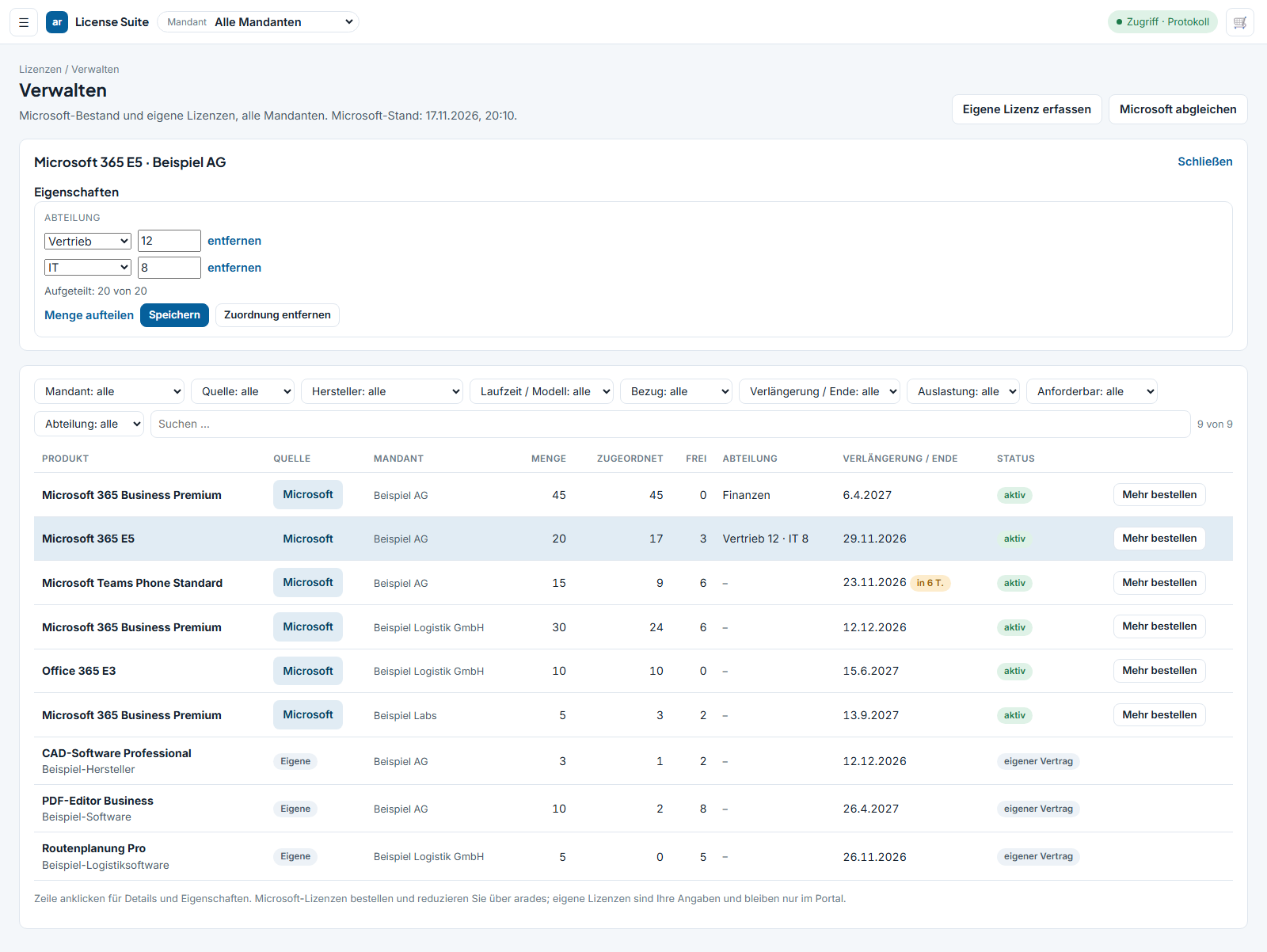
Create your own attributes — department, cost center, location — and split license quantities across them, for example twelve for sales and eight for IT. None of this is written to Microsoft.
Create roles with a license template: you define which Microsoft products and which third-party licenses belong to “Field Sales”. Several roles per person, each license counts once.
Reconcile people from Microsoft, additionally record staff without a Microsoft account, assign and change roles, handle joiners and leavers.
Microsoft subscriptions and licenses from other vendors in the same inventory — with license model, quantity, contract number, term, notice period and automatic renewal.
Define per person which tenants they see and what they may do: view, request, approve, order, administer. Per tenant and per right individually.
Control
For every Microsoft subscription you obtain through arades — from the portal, without going through support or a distributor. Only whoever holds the subscription can change it.

Add licenses or reduce them for the next renewal, with a note on the cancellation window.
Switch it on or off per subscription — visible in the inventory, not hidden in a setting.
Cancel a subscription while the window is open. The portal shows the last possible day.
Monthly, annual or three-year, with monthly or annual payment — per subscription.
In the portal
Screenshots from the portal. All data shown is fictitious.
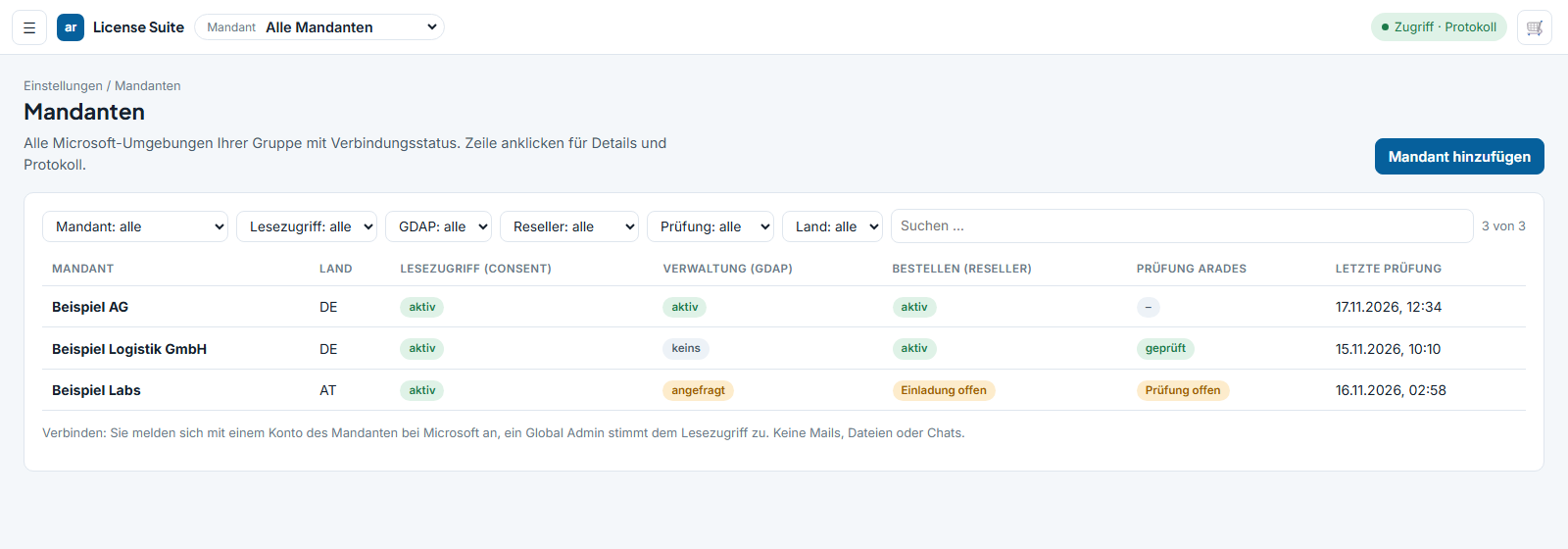
Tenant hub. Connect, status per tenant, tenant switch, request a new tenant.
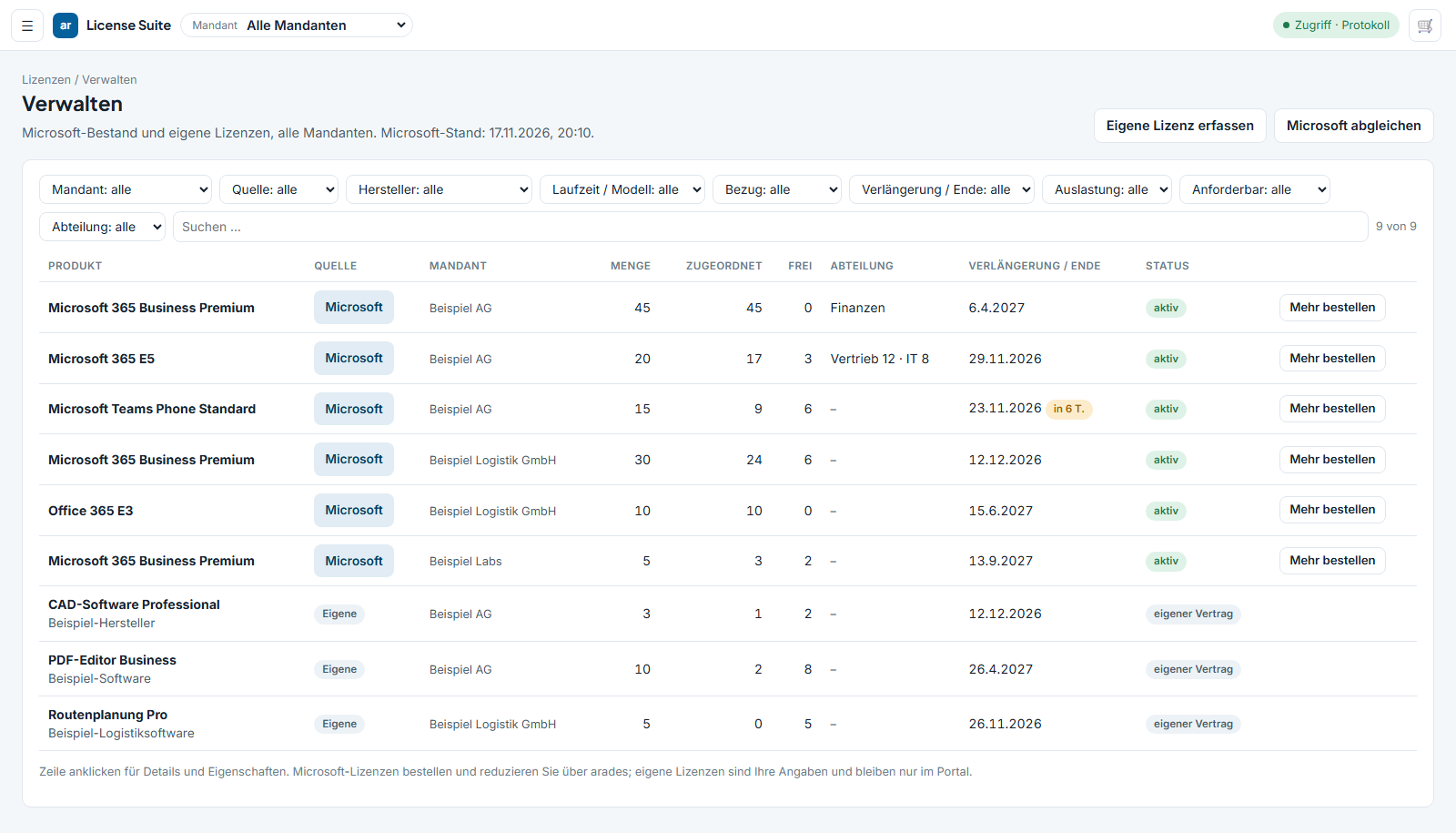
License inventory. Product, tenant, purchased, assigned, free, department, renewal, purchase channel. Filter by vendor, term, deadlines and utilization.
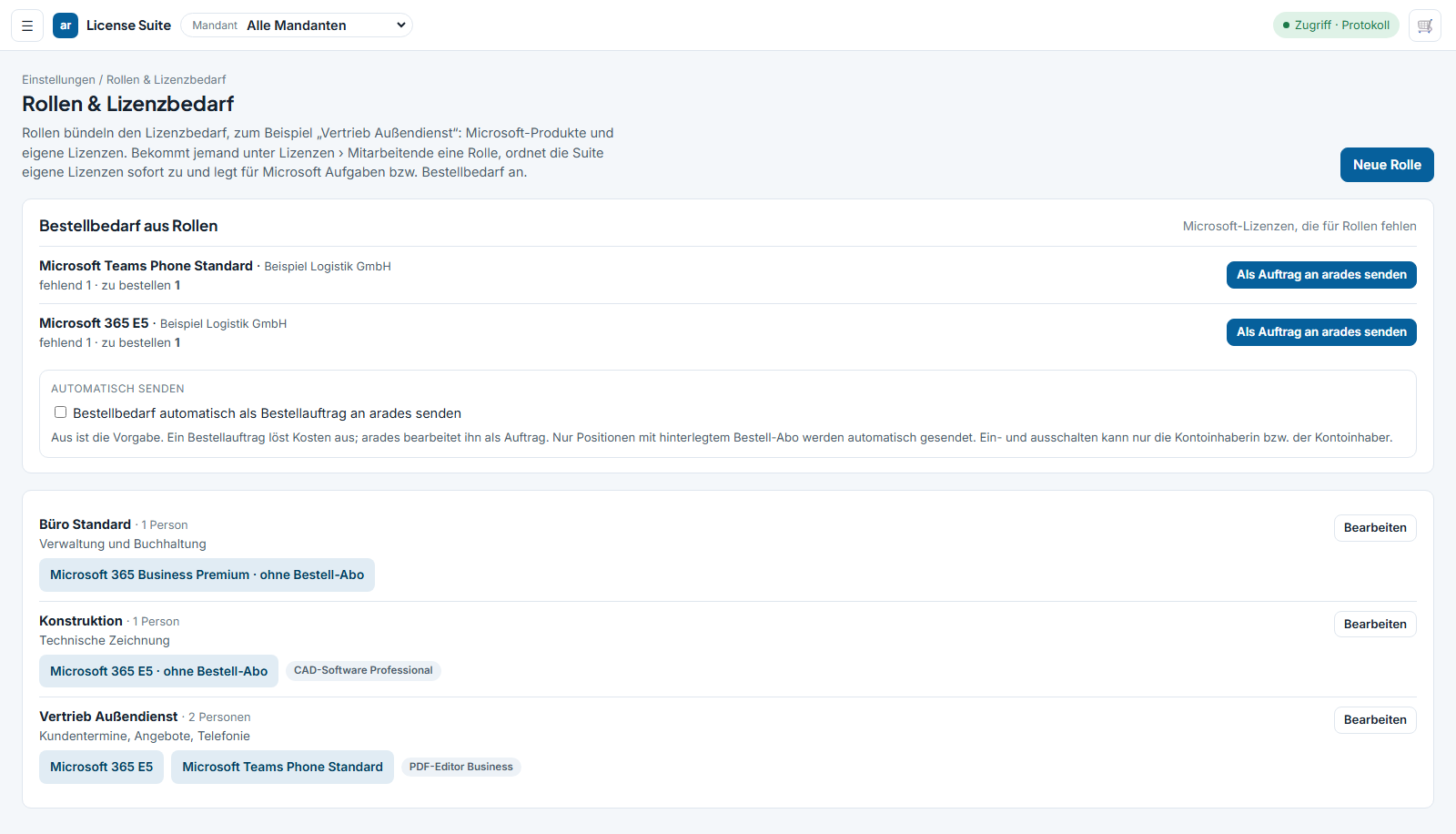
Roles with a license template. One template per role, demand as the union of several roles, ordering demand bundled per tenant and product.
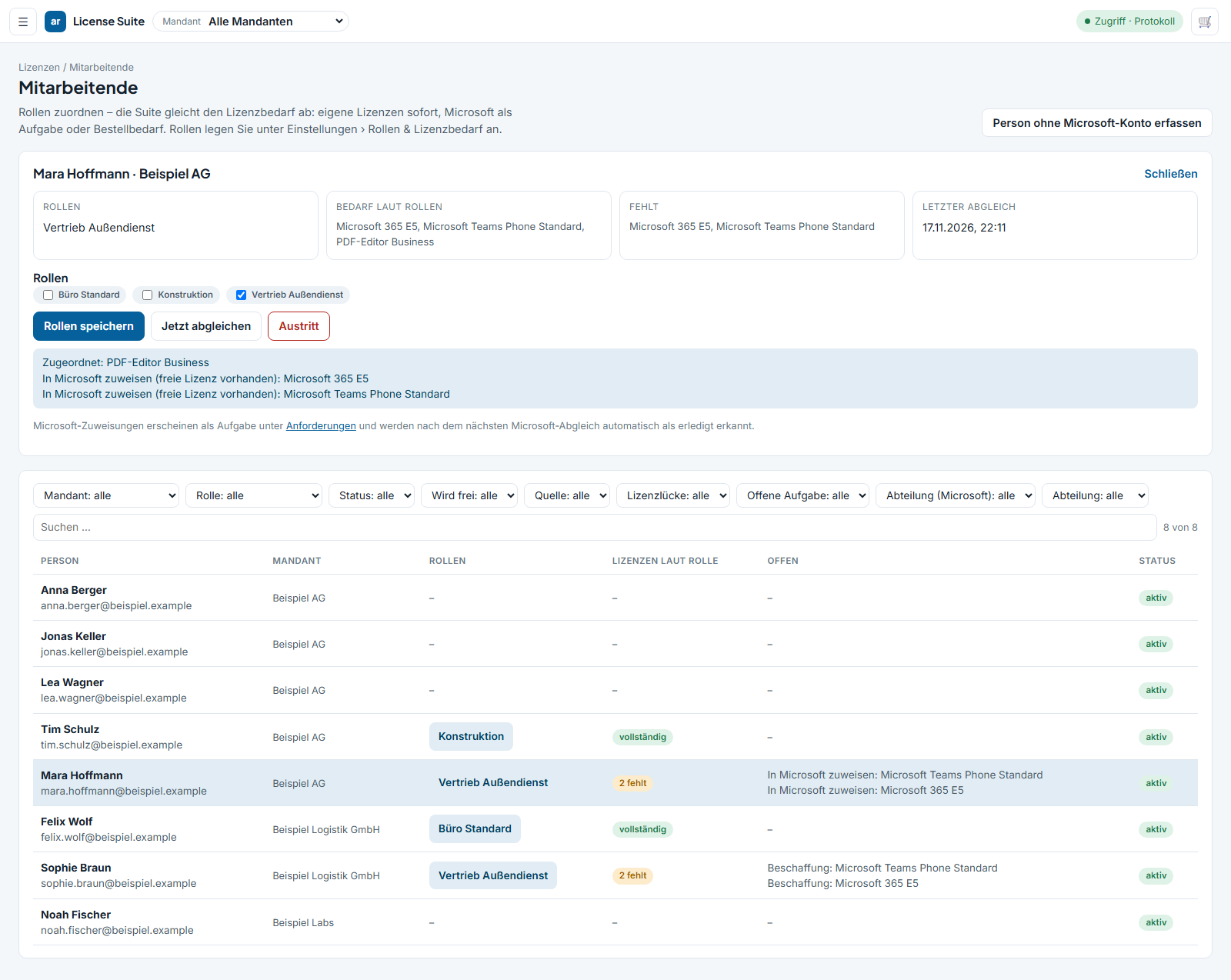
Staff and target-actual. Assign a role, demand against inventory, free third-party licenses are assigned, for Microsoft a task is created.
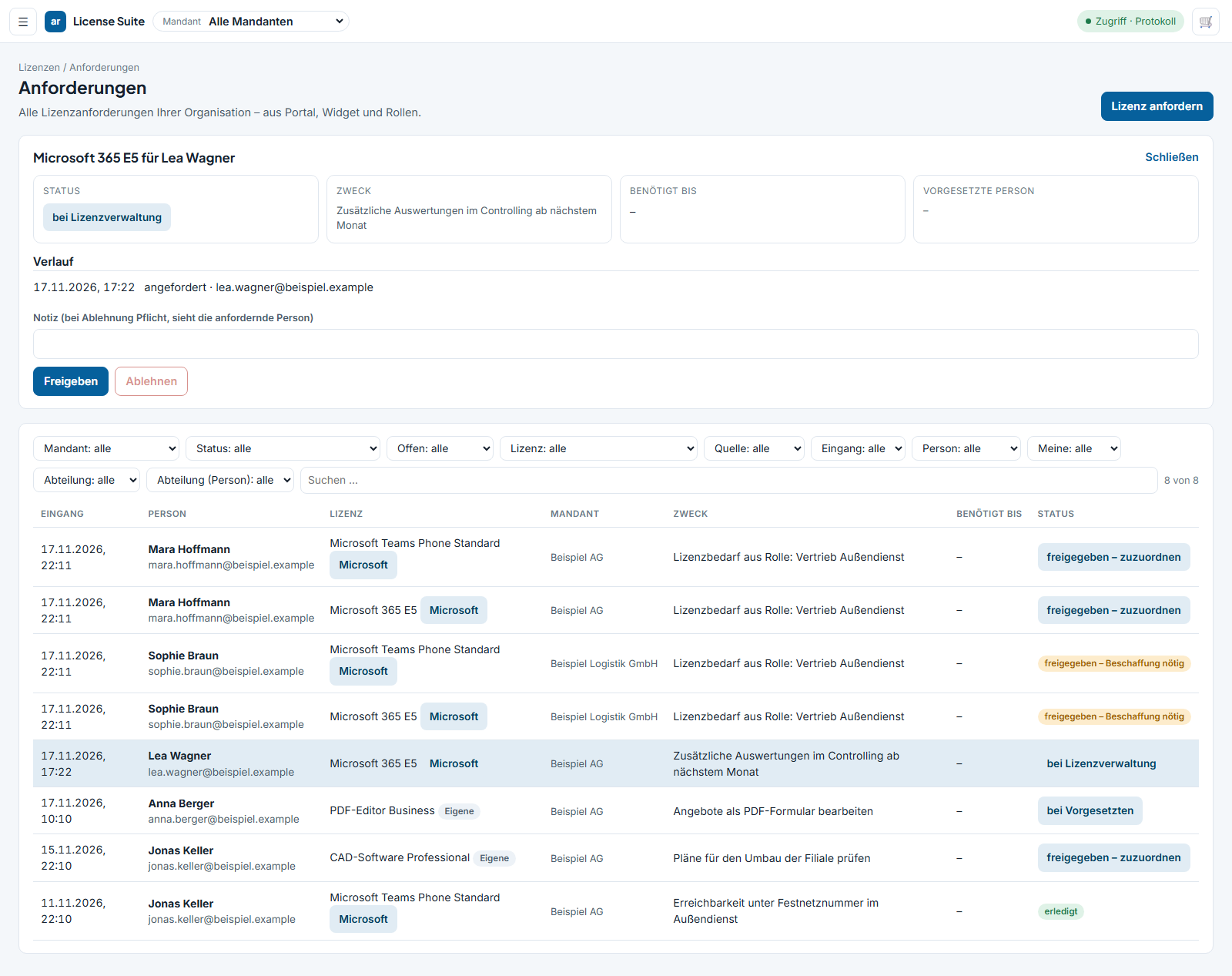
Requests. Requests from the portal, the widget and roles, purpose mandatory, approval in up to three stages.
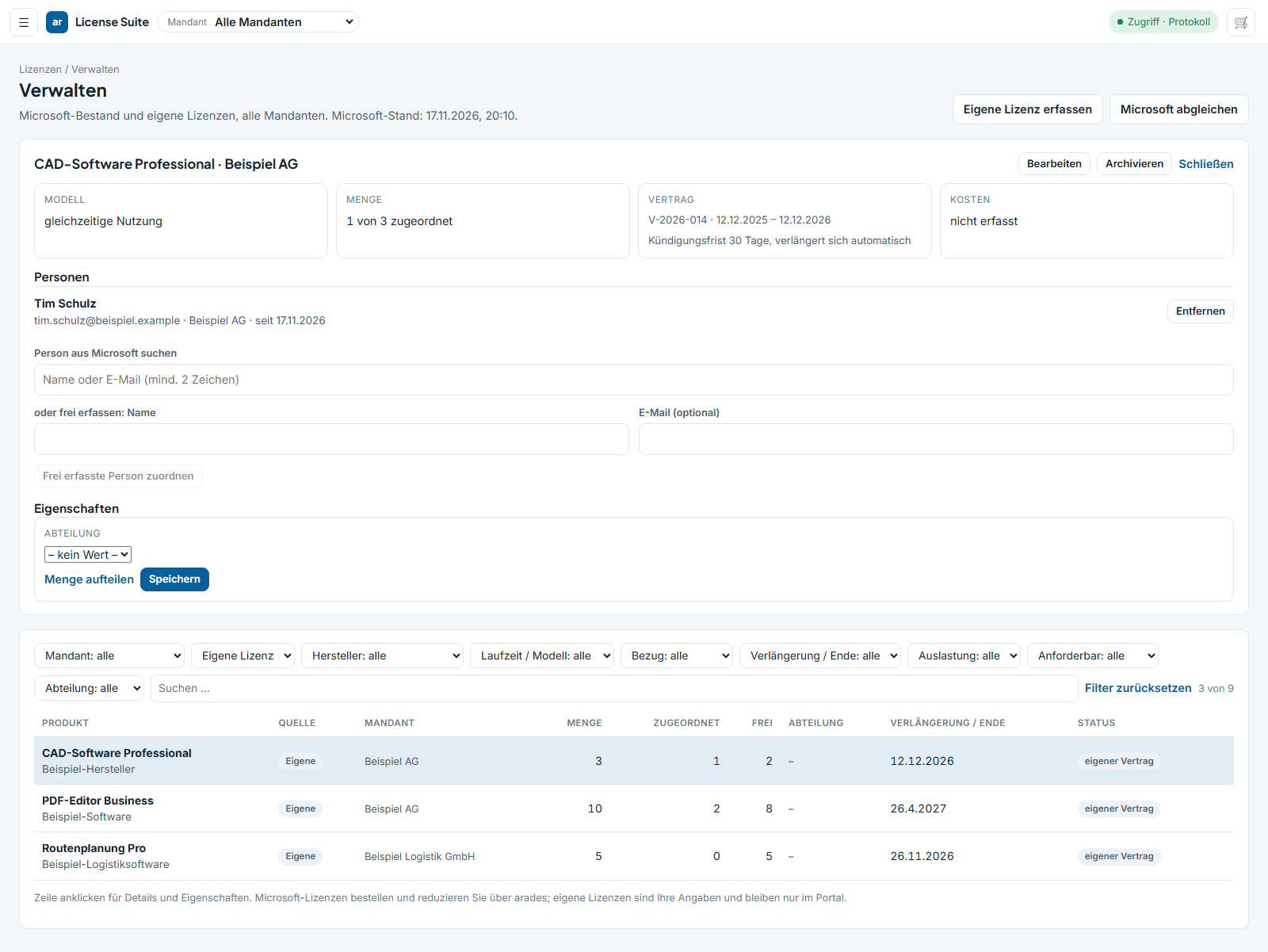
Other vendors and contracts. License model, quantity, contract number, term, notice period, automatic renewal, assignment to people.
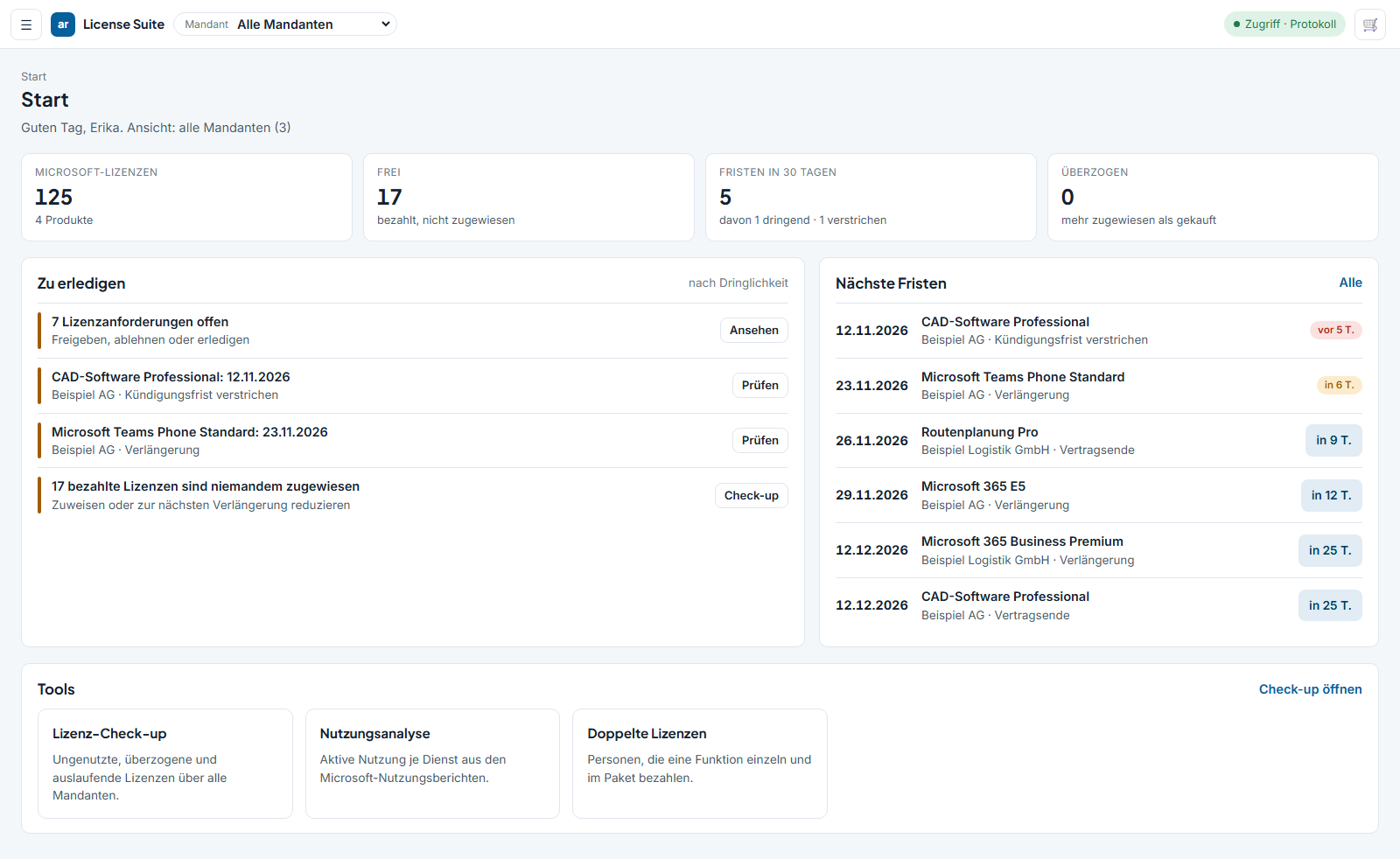
Deadlines and tasks. Renewals of Microsoft subscriptions and third-party contracts in one list, tasks by urgency.
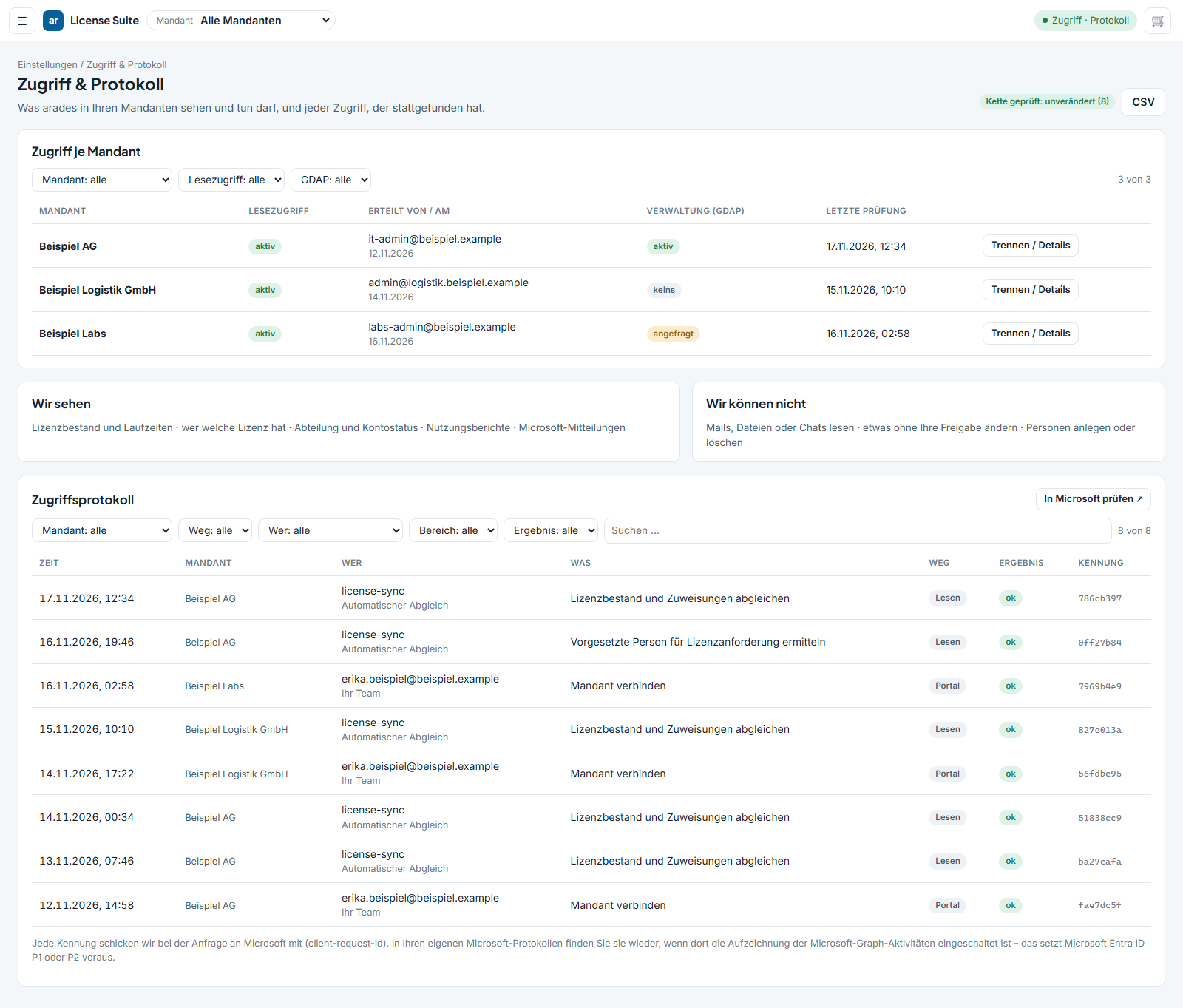
Access and audit log. Rights per tenant in plain language, disconnect with one click, a log with purpose, result and an identifier per call, CSV export.
Optimize
Across all tenants at once, with a note on from what date a change takes effect.

Purchased, paid for, assigned to nobody — per product and tenant, with the next date on which the quantity can be reduced.
Per person: which services are paid for through two licenses at once. The overlap is reported as complete or partial; services switched off in Microsoft do not count.
More assigned than purchased. Microsoft can block the affected users — the portal reports the case before it happens.
Anyone on a large plan who uses only what a smaller one already covers. The basis is the usage report from Microsoft.
Shared mailboxes that require a license because of their size or an enabled archive, room and resource mailboxes, service accounts, guest accounts, accounts that have never signed in.
Anyone working for two companies often holds two full licenses. Only an inventory that brings all tenants together produces this finding.
Assign
You give a person a role; the suite determines the demand from that role’s license template and reconciles it against the existing inventory — in the tenant the person belongs to.
If a role is removed or a person leaves, the assignments that came from roles are released and the Microsoft license is reported as “becoming free”. Assignments made by hand remain untouched.
Request and approve

A request in the portal, a request through a widget in the intranet or SharePoint with sign-in via a Microsoft account, or automatically from a role.
Line manager, department owner, license management. Anyone who requested it themselves or has already decided does not decide again.
You define which software is offered to a department — optionally restricted to exactly that selection.
Every request states a purpose. Every decision is recorded with person, time and note in the history.
On request, an email to the approver and the outcome to the requester. The decision is made in the suite.
When a license becomes free, it is offered to the oldest matching request — instead of buying what will be free in three days anyway.
Deadlines and decisions
Every overview carries the date. What counts is the last day on which a change still takes effect.

Renewals of Microsoft subscriptions and third-party contracts in one list, with notice period and dates that have passed.
An email at the deadline, a second and third stage, a deputy. A deadline that passes without a decision creates an entry.
For every finding: act on it, defer it or discard it — with a reason. The decision is stored and not recalculated on every visit.
“Act on it” receives an execution date inside the cancellation window. On that date we reduce the subscription and confirm it to you.
License news
Price changes, discontinued products, new plans, changed licensing rules and expiring transition periods — put in context by us, not forwarded.

Every item is linked to products. The portal uses that to determine how many of your licenses are affected, and in which tenants.
The most important field of every item. The dashboard shows only those items that call for action and touch your inventory.
When a transition period ends, a date appears in your deadline list — not just a note buried in prose.
Access
The application does not request its rights in advance, but only when you want to use the corresponding function. Each stage is a separate application with its own consent in your tenant.
A single read right: tenant name, license inventory, terms. Only a global administrator in your tenant may connect.
Seeing who holds which license requires a second, separate consent. Until then the application sees no person at all.
Every call with purpose, result and identifier, chained and exportable as CSV. You will find that identifier again in your own Microsoft logs.
One click: the calls stop, all stages are reset, your tenant data held by us is deleted.
Support
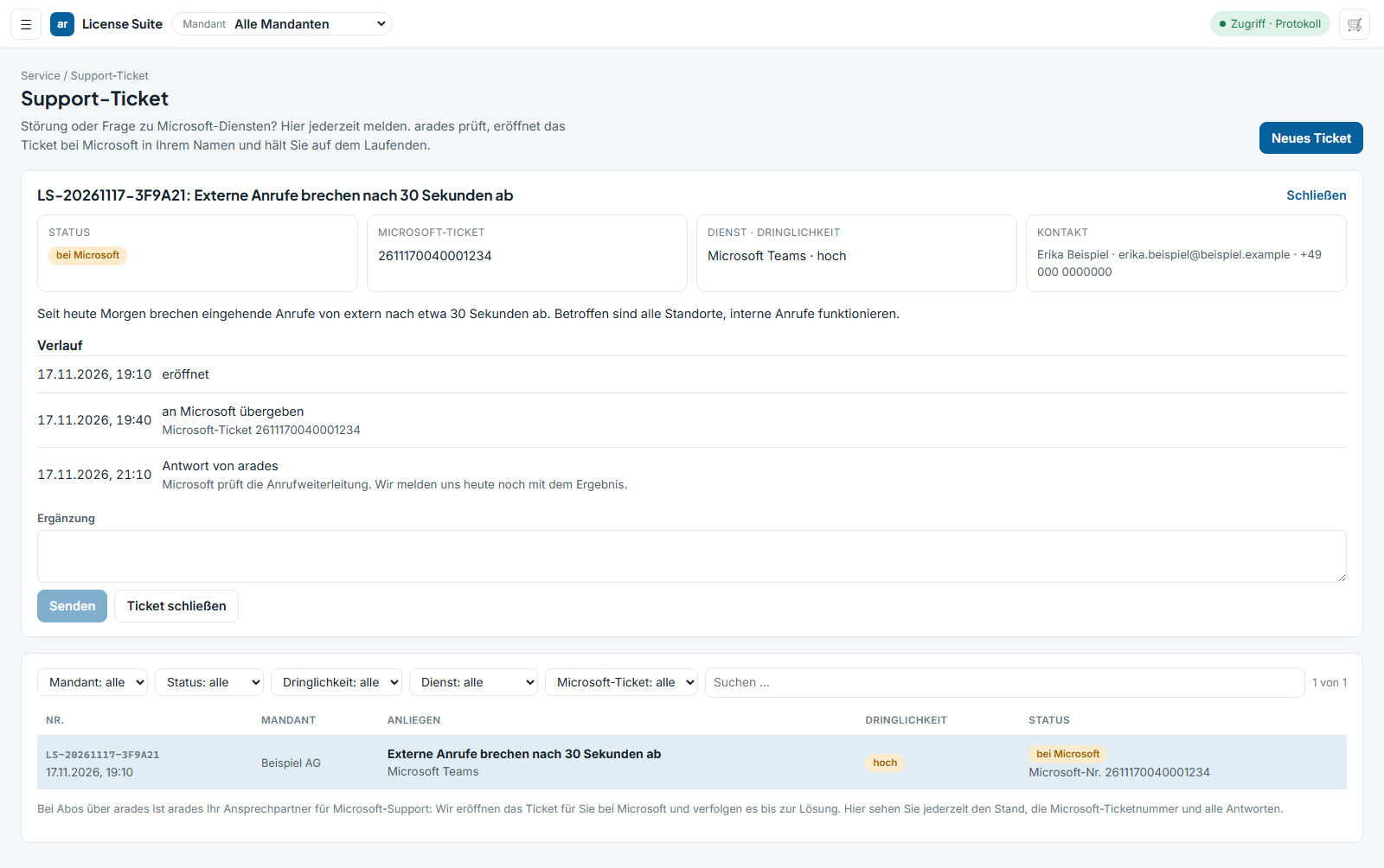
Anyone who obtains Microsoft through a partner cannot open their own ticket in the Microsoft 365 admin center — that is Microsoft’s rule, not a setting. That makes us your point of contact, and the portal is the way in.
A ticket with tenant, service, urgency and description. The status separates “with arades” from “with Microsoft” including the ticket number — it only says “submitted” once that number exists. History and replies remain readable in the portal.
Next step
The connection is read-only and is granted by a global administrator of your tenant. You can disconnect at any time with one click.
Demo
One connected tenant is enough. We walk through your inventory, your deadlines and your findings.
Frequently asked questions
Not for inventory, roles, requests and deadlines — every tenant can be connected read-only, regardless of where the licenses were bought. Changing quantities, canceling and carrying out changes on the agreed date require the subscription to run through us: only whoever holds it can change it.
On connecting, a single read right: purchased licenses, terms, tenant name. For people and assignments you grant a second, separate consent. The application does not request usage reports or Microsoft messages at present. Only a global administrator may connect.
Allocation through roles and the target-actual check run in the portal. The actual assignment in Microsoft is carried out with your own permissions and appears under your name in your logs — the suite does not write to your directory.
Yes. You record third-party licenses with license model, quantity, contract, term and notice period and assign them to people. They appear in the same inventory, in the same role templates and in the same deadline list as the Microsoft subscriptions.
As current as the last reconciliation. You trigger it per tenant; inventory, assignments and dates then reflect that state. Every view states the time at which it was read.
Through the portal, through a widget in the intranet or SharePoint with sign-in via a Microsoft account, or automatically from a role. Every request states a purpose, every decision is recorded with person and time in the history.
No. Per person you define which tenants they see and what they may do — view, request, approve, order, administer, per tenant and per right.